Zugriff auf kostenloses PDF erhalten

Entfesseln Sie die Kraft von Prompt Engineering 101
Master the art of prompt engineering and supercharge your AI projects with our comprehensive guide. Learn the secrets behind crafting effective prompts.


Master the art of prompt engineering and supercharge your AI projects with our comprehensive guide. Learn the secrets behind crafting effective prompts.

Snippets in Promptitude are reusable blocks of text — brand values, legal disclaimers, product descriptions, personas — that you insert into any prompt or chat using a simple {{name}} tag. Create a snippet once, use it everywhere, and any edit you make updates it instantly across all prompts where it appears.
Key points
{{snippet_name}} syntax..txt files, and access can be restricted by role on paid plans.{{promptitude.today}}, {{promptitude.currentUser.name}}, {{promptitude.currentUser.email}}, and {{promptitude.currentUser.role}}.Whether you’re juggling multiple projects, managing data, or coordinating a team, staying organized and consistent is key to getting things done efficiently. That’s where snippets come in. But what exactly are they? If you’ve ever wondered “what is a snippet”, think of it as a smart shortcut—a reusable block of text that saves you from typing the same information over and over. In Promptitude, snippets are more than convenience; they’re a productivity hack that keeps your messaging on point and your workflow lightning fast.
Whether you’re drafting marketing copy, internal documentation, or customer communications, understanding how to add, edit, and select snippets can transform the way you work.
Snippets are reusable pieces of text you can insert anywhere in your prompts or chats. Think mission statements, brand values, or recurring industry phrases. By creating a snippet once, you can ensure that it’s accurately and consistently used every time—no more copy-paste errors, no more reinventing the wheel.
If you’re still asking, “what is a snippet?”, imagine having a toolbox of pre-written content ready to drop into your workflow whenever you need it.
Snippets are more than text shortcuts — they’re workflow enhancers. Using snippets in Promptitude brings measurable advantages for individuals and teams alike:
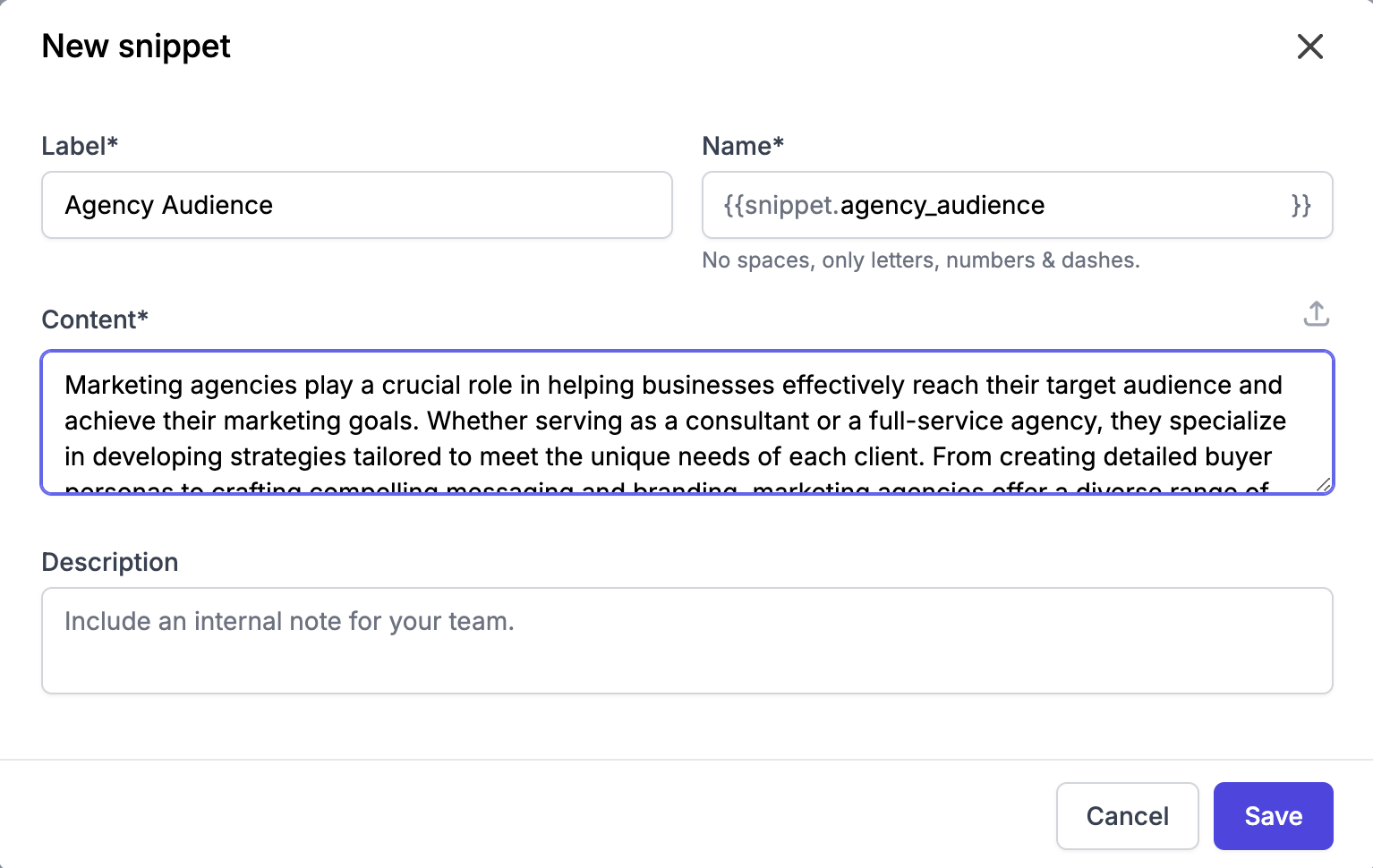
Creating a snippet in Promptitude is simple:
1️⃣ Navigate to Settings in the main sidebar.
2️⃣ Click the Snippets tab.
3️⃣ Press Add snippet.
4️⃣ Provide a label for easy identification, set the name, and add the content.
5️⃣ Click Save to store your snippet for future use.
Pro tip: You can also upload .txt files if your content is pre-written, making snippet creation even faster.
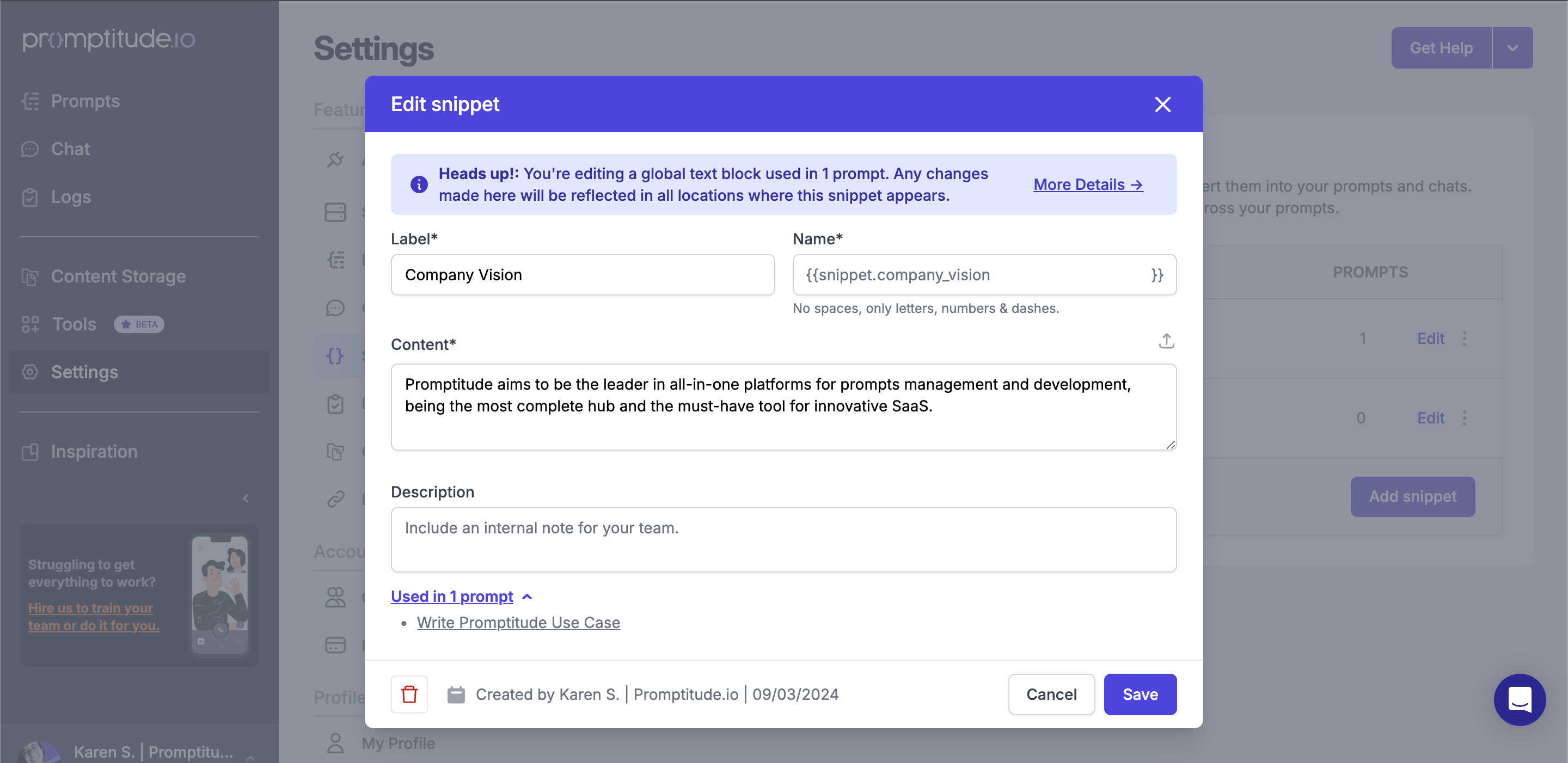
Need to tweak a snippet? No problem: Modifying an existing Snippet is equally simple:
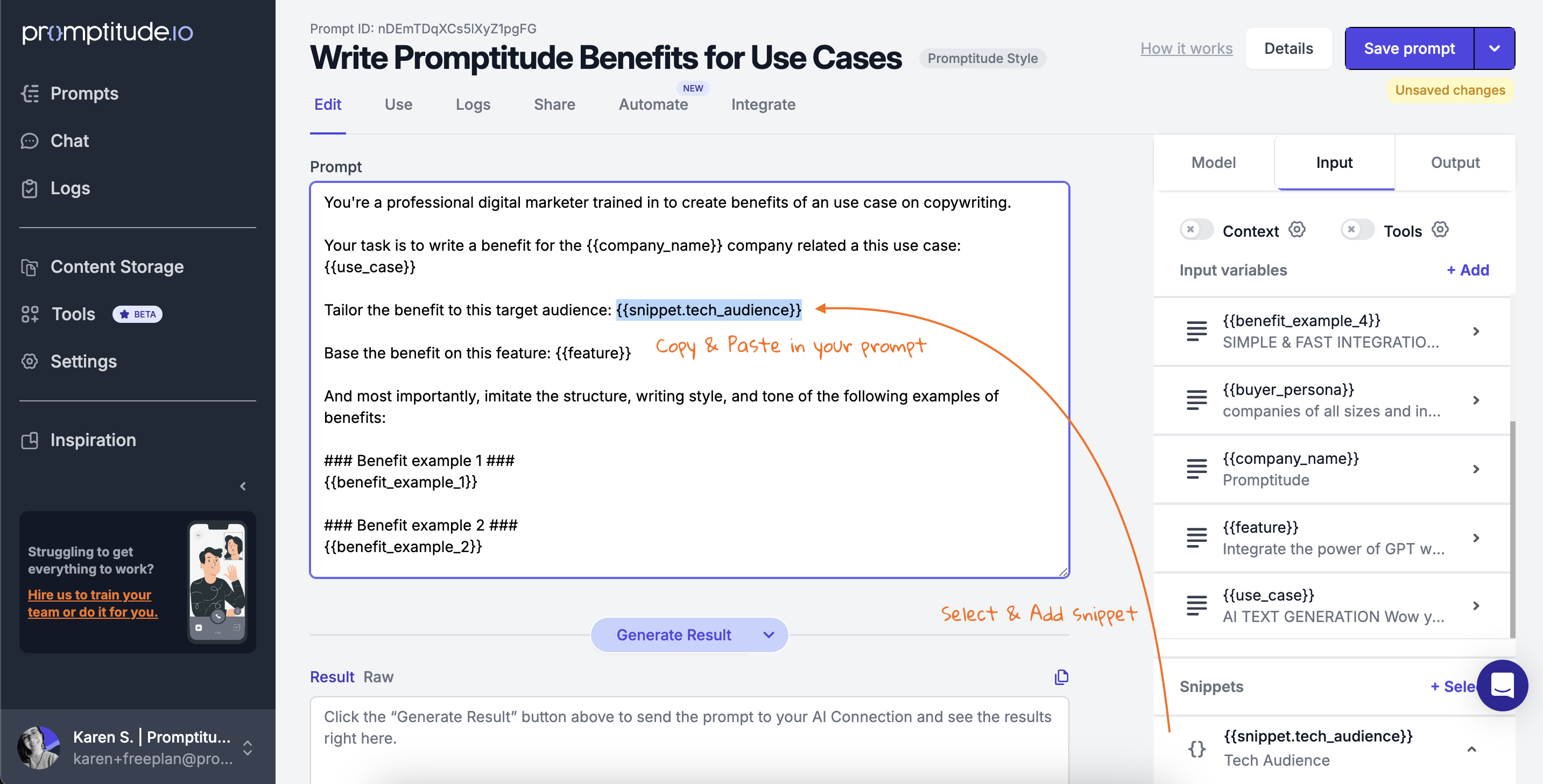
You can also use your Snippets in the structure of your prompts by adding the {{name}} that your Snippet has, even without selecting them in the input tab.
To use a snippet in your prompt:
This feature allows you to dynamically include predefined content, ensuring consistency without manual repetition.
Promptitude comes with a set of default snippets designed to save you time and keep your content consistent. These ready-to-use snippets can be dropped into any prompt, making repetitive tasks effortless:
By leveraging snippets, you can streamline content creation, reduce errors, and ensure every message aligns perfectly with your brand’s voice.
For organizations using Promptitude's paid plans with Roles enabled, you can control who can edit specific prompts, Snippets, and chats through Restricted Permits. This feature helps protect finalized content and maintain the integrity of your creations.
Promptitude’s Snippets feature isn’t just a convenience—it’s a productivity multiplier. By creating reusable blocks of text, you eliminate repetitive work, reduce inconsistencies, and keep every piece of communication aligned with your brand’s tone and style. Whether you’re an independent creator or part of a growing team, mastering Snippets can transform the way you build and scale your AI workflows.
💡 Ready to streamline your workflow? Discover how Snippets work and start building smarter, faster, and more consistent AI-powered content today.
Create your first snippet today!
Stay tuned—Promptitude is constantly evolving with new tools and smarter features to help you get the most out of every prompt.
What are snippets in Promptitude and how do they work?
Snippets are reusable text blocks stored in your Promptitude account and inserted into prompts using {{snippet_name}} syntax. You create a snippet once — a brand tagline, product description, or legal disclaimer — and call it anywhere in your prompts. When the snippet is updated, the change applies automatically across every prompt that references it, so there's no manual updating across multiple places.
What is the difference between a snippet and a prompt variable in Promptitude?
Prompt variables are dynamic inputs that change with each run — the user fills them in via a form. Snippets are static, pre-written blocks of text that stay consistent across runs. Use variables when the content changes per use case; use snippets when the content should always be the same — brand voice guidelines, standard disclaimers, or fixed persona descriptions that every prompt should include without variation.
What are the most practical use cases for snippets?
Snippets work best for content that recurs across many prompts without changing: company mission statements, target audience personas, legal disclaimers, standardized product descriptions, and brand tone guidelines. They're also useful for team-wide context — like a shared definition of your ideal customer — that every member's prompts should reference consistently without each person maintaining their own version.
Can multiple team members use and edit the same snippets in Promptitude?
Yes. Snippets are shared across your Promptitude workspace, so any team member can call the same snippet in their prompts. On paid plans with Roles enabled, you can use Restricted Permits to control who can edit specific snippets — protecting finalized content like approved legal copy or brand guidelines from accidental changes while keeping them accessible for everyone to use.
What happens to prompts when a snippet is edited?
Any change you make to a snippet updates it immediately across all prompts that reference it. There's no need to manually find and update each prompt individually. This makes snippets particularly useful for information that changes periodically — like pricing tiers, product names, or seasonal messaging — where a single edit needs to propagate everywhere at once.
Does Promptitude include any default snippets?
Yes. Promptitude includes four built-in system snippets: {{promptitude.today}} inserts the current date, {{promptitude.currentUser.name}} inserts the active user's name, {{promptitude.currentUser.email}} inserts their email, and {{promptitude.currentUser.role}} inserts their role. These are particularly useful for prompts that need to be personalized dynamically without requiring the user to fill in a form field each time.


Easily incorporate advanced generative AI into your team, product, and workflows with Promptitude's plug-and-play solutions. Enhance efficiency and innovation effortlessly.
Sign Up Free & Discover NowErleben Sie die perfekte KI-Lösung für alle Unternehmen. Optimieren Sie Ihre Abläufe mit müheloser Prompt-Verwaltung, -prüfung und -bereitstellung. Optimieren Sie Ihre Prozesse, sparen Sie Zeit und steigern Sie die Effizienz.
Unlock AI Efficiency: 50k Free Tokens