Zugriff auf kostenloses PDF erhalten

Entfesseln Sie die Kraft von Prompt Engineering 101
Master the art of prompt engineering and supercharge your AI projects with our comprehensive guide. Learn the secrets behind crafting effective prompts.


Master the art of prompt engineering and supercharge your AI projects with our comprehensive guide. Learn the secrets behind crafting effective prompts.

To get an API key for a major AI model, sign in to the provider’s developer console, enable billing or confirm free-tier access, then create a key in the API keys section. This guide shows the exact path for OpenAI, Anthropic, Gemini, Perplexity, Mistral, and Groq.
What this guide covers:
Most major commercial AI models are available in two ways: as a chat product with a user interface and as an API that developers use to build their own applications. The company behind each model offers both, but they are separate products with separate accounts, separate billing, and separate credentials. Understanding this distinction is the starting point for getting and using an API key.
The pattern is the same across every provider: the company builds the model, the chat product is one finished application on top of it, and the API is direct access to the model itself — without any interface in between.
This is the question that trips up most people getting started. ChatGPT and the OpenAI API are two separate products made by the same company.
OpenAI is the company. ChatGPT is the consumer chat product that OpenAI builds and maintains. The two are related but not the same. When you open chat.openai.com and have a conversation, you are using ChatGPT — a finished product with a user interface, conversation history, and built-in tools like image generation and file uploads. OpenAI's APIs serve a broader developer audience, while ChatGPT caters to end users of conversational AI.
The OpenAI API gives you direct access to the underlying models — from fast, non-reasoning models like GPT-4o to more advanced, reasoning-capable models such as the latest GPT-5.4 — without the chat interface. You send a prompt, you receive a response, and you decide what happens with it.
When you encounter a tool that claims to be "powered by GPT," you are using OpenAI's technology but not ChatGPT itself. Those tools connect to the GPT models through the OpenAI API, a direct, programmatic line to the models that bypasses the chat interface entirely. ChatGPT uses flat‑rate subscription plans with usage caps that vary by tier, while the API is priced on a metered, pay‑per‑token basis — you pay for what you actually use.
Anthropic is the company that created and maintains the Claude model family. Claude.ai is Anthropic's chat product — a productivity-focused interface with Projects, document analysis, and long-context capabilities. A Claude Pro subscription unlocks higher usage within that interface. It does not unlock API access. This is the most common source of confusion for people who have been using Claude.ai and want to start building with it.
The Anthropic developer console at console.anthropic.com is an entirely separate platform with its own account, its own billing, and its own API credentials. A Claude Pro subscriber who wants to use the API still needs to complete the full developer setup — including adding a payment method to the console — before any API call will work.
Google is the company. Gemini is both the name of Google's AI model family and the name of their consumer chat product at gemini.google.com — which is integrated into Google Workspace apps like Docs, Gmail, and Drive, and available as part of Google One subscriptions.
The Gemini API is accessed through a completely different platform: Google AI Studio at aistudio.google.com. A standard Google account is enough to log in, and a Gemini Advanced subscription has no bearing on API access — the two are entirely independent. Currently Google AI Studio offers one of the most generous ongoing free tiers among major providers: you can make Gemini API calls on the free tier with no credit card required, subject to per‑minute and per‑day limits and model restrictions. API keys are generated within AI Studio and carry their own usage quotas, separate from anything tied to a Gemini chat subscription
When you use a tool or application that says it is "powered by GPT" or "powered by Claude," you are using OpenAI's or Anthropic's technology but not the chat products themselves. Those tools have an API key behind them. That is exactly what this guide helps you get.
Using the API rather than a chat interface gives you three things a chat subscription does not.
Go to platform.openai.com and sign up or log in. OpenAI requires you to verify your email address and may request a phone number during registration. Once logged in:
Go to console.anthropic.com and click Build with Claude or Sign Up. Anthropic does not use passwords — it sends a one-time magic link to your email address. Click the link to verify and log in.
Google AI Studio offers a generous free tier that lets you call Gemini models without adding a credit card, but quotas and model access may change over time. As of 2026, free usage is limited and primarily focused on Flash/Flash-Lite models, with higher tiers and Pro models requiring billing.
Note: To continue using the API without interruption, restrict your key — Google is phasing out unrestricted traffic keys. In AI Studio, click the ‘Restrict to Gemini API’ button (or the current restriction option) to limit where your key can be used and keep it secure.
Visit perplexity.ai and sign up using Google, Apple, SSO, or email. Free accounts can generate API keys, but they usually do not include recurring monthly credits. Perplexity Pro subscribers often receive a monthly API credit allowance (for example, around $5), though the exact amount and terms can change, so always confirm in your account billing settings.
Groq offers a free tier account: you can sign up at console.groq.com, create an API key with no credit card, and use their hosted models within rate limits. The free tier is capped by per-minute or per-day limits, so it’s best for experimentation rather than heavy production use.
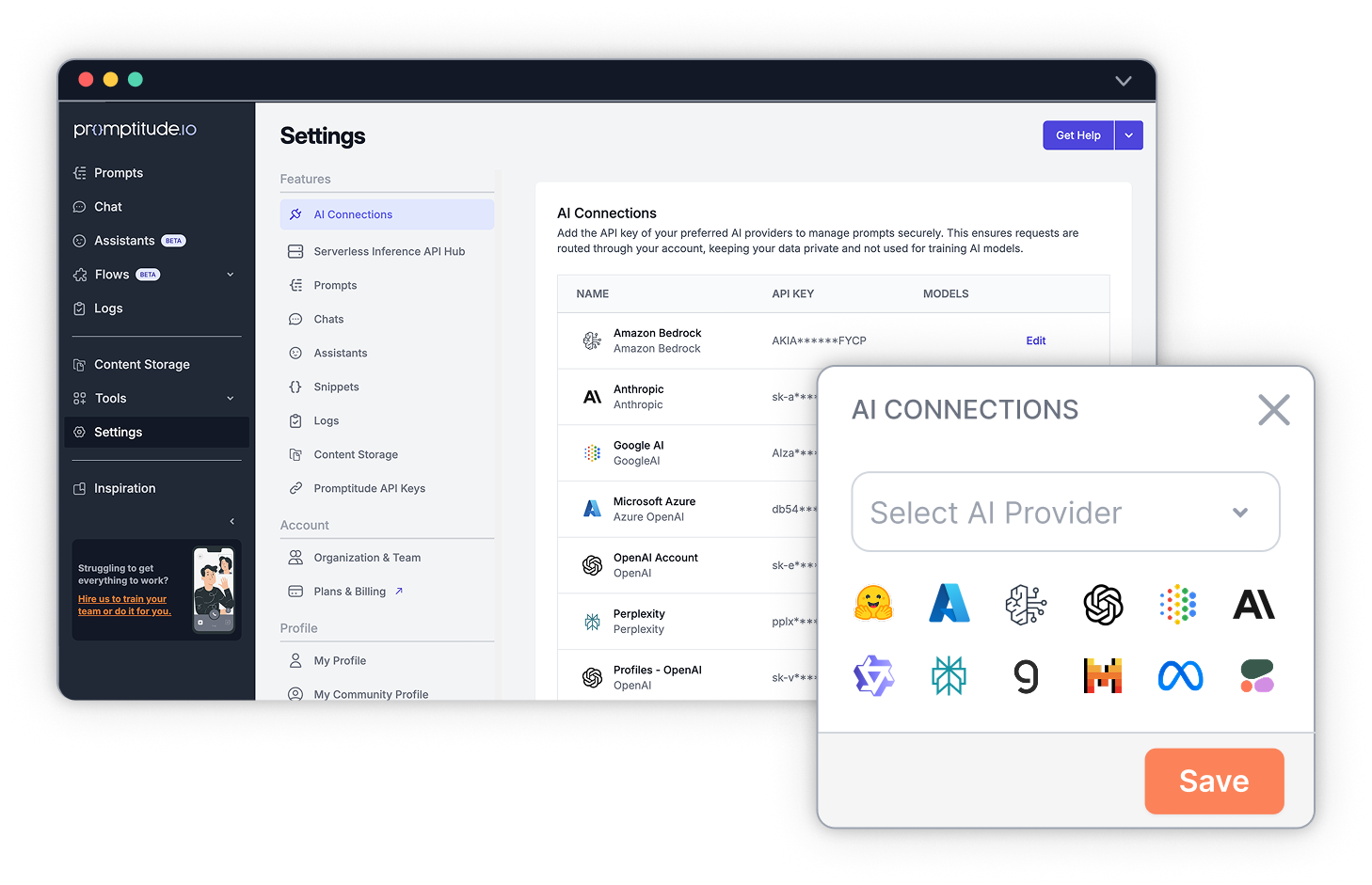
If you use Promptitude, you can store each provider key and reuse it across prompts. Go to Settings → API Keys, select the provider, paste your key, and save. That lets your team reuse the same provider setup across prompts without re-entering credentials for each workflow. From that point, every prompt in your shared library can use that provider's models — switchable from a dropdown, testable side by side, and deployable via REST API without any code changes.
Your organization's content storage connects directly to those prompts, so outputs are shaped by your own knowledge base rather than starting from scratch each time.
Ready to connect your API keys? Add your first key to Promptitude →
Free tier details and quotas change frequently. Always confirm current limits in each provider's console or pricing page before building on the assumption of continued free access.
An API key is a unique code that identifies your account when you send requests to an AI provider's models. Every time your application calls the API — to run a prompt, generate text, or process a request — the key is included in the request header. The provider uses it to verify who you are, track your usage, and calculate what you owe. Treat your API key like a password — if it falls into the wrong hands, others can use it to access the provider's services at your expense
Yes. Each provider issues its own API key through its own developer console. You need a separate account and key for OpenAI, Anthropic, Gemini, Perplexity, Mistral, and Groq. In Promptitude, you add each key once under Settings → API Keys, and all your prompts can then use any of those providers from a single interface.
For most providers — OpenAI, Anthropic, Mistral, Groq, and Perplexity — the key is shown only once at creation. If you lose it, revoke the old key in the provider's console and generate a new one. Update the new key in Promptitude under Settings → API Keys. Your prompts and workflows are not affected — only the key reference changes.
For structured, repeatable use cases — running the same prompt template across many inputs — the API is typically much cheaper than a flat monthly subscription. The API is priced on a metered basis: you only pay for what you use. A chat subscription charges the same amount whether you use it heavily or not. For teams running consistent, well-structured workflows rather than open-ended conversations, API pricing is often more cost-effective, but the exact savings depend on your prompts, token usage, and volume.
It reduces the chance that a secret can be exposed later from the UI. If you lose it, you usually need to create a new one.


Easily incorporate advanced generative AI into your team, product, and workflows with Promptitude's plug-and-play solutions. Enhance efficiency and innovation effortlessly.
Sign Up Free & Discover NowErleben Sie die perfekte KI-Lösung für alle Unternehmen. Optimieren Sie Ihre Abläufe mit müheloser Prompt-Verwaltung, -prüfung und -bereitstellung. Optimieren Sie Ihre Prozesse, sparen Sie Zeit und steigern Sie die Effizienz.
Unlock AI Efficiency: 50k Free Tokens




%20%26%20Content%20Storage.png)

.png)

